Quick Start
Go to ‘backup’ on both units and load the following presets for config settings:
| Preset 1 | 2in 4out DMX splitter (XLR) |
| Preset 3 | ARTnet |
| Preset 10 | sACN |
Via 4 x DMX XLR’s
Net XII Settings:
Backup method (Best): On both Units, go to Backup, load preset 1 and power cycle.
Manual method: On both units, go to User Preset, choose 2×4 DMX splitter and power cycle.
Desk Settings:
| Line 1 – DMX Expert A |
| Line 2 – DMX Expert B |
| Line 3 – DMX Expert C |
(NOTE: changes to operating mode may take up to 30 secs).
ARTNET
Net XII Settings:
Backup method (Best): On both Units, go to Backup, load preset 3.
Manual method: On both units, go to User Preset and choose ART-net 8 port DMX. Set netmask on both units to: 255.0.0.0 and set manual IP to: 2.0.0.1 (top unit) / 2.0.0.2 (bottom unit).
On the top unit, In set DMX port, change ports 1-4 to universe 000 and 5-8 to universe 001. Check the protocol on DMX inputs is set to ART-net and input A starting address is 000, input B starting address is 001.
On the bottom unit, In set DMX port, change ports 1-4 to universe 000. Check the protocol on DMX inputs is set to ART-net and input A starting address is 000.
(NOTE: changes to operating mode may take up to 30 secs).
Desk Settings:
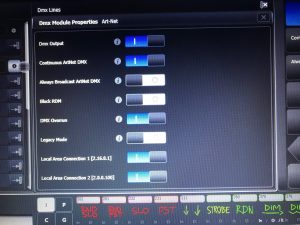
Set the connected ethernet port to: IP – 2.0.0.100 and the subnet to 255.0.0.0 in Network settings. In DMX settings, the ART-net should poll automatically. If not, click the settings icon on the ART-net and confirm the correct network is switched on.
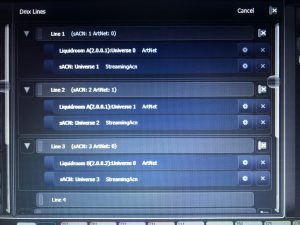
| Line 1 – Liquidroom A / Universe 0 |
| Line 2 – Liquidroom A / Universe 1 |
| Line 3 – Liquidroom B / Universe 0 |
sACN
Net XII Settings:
Backup method (Best): On both Units, go to Backup, load preset 10.
Manual method: On both units, go to User Preset and choose sACN 8 port DMX. Set netmask on both units to: 255.0.0.0 and set manual IP to: 2.0.0.1 (top unit) / 2.0.0.2 (bottom unit).
On top unit, In set DMX port, change ports 1-4 to universe 001 and 5-8 to universe 002. Check the protocol on DMX inputs is set to sACN and input A starting address is 001, input B starting address is 002.
On bottom unit, In set DMX port, change ports 1-4 to universe 003. Check the protocol on DMX inputs is set to sACN and input A starting address is 003.
(NOTE: changes to operating mode may take up to 30 secs).
Desk Settings:
Set the connected ethernet port to: IP – 2.0.0.100 and the subnet to 255.0.0.0 in Network settings. In DMX settings, check the settings icon on the sACN and confirm the correct network is switched on.
| Line 1 – sACN Universe 1 |
| Line 2 – sACN Universe 2 |
| Line 3 – sACN Universe 3 |
Standard Config showing ARTnet & sACN
ARTnet Polling

ARTnet settings